Alabama Weather Network
- 4.7
- Rating
- 10.00K
- Installs
- Free
- Price

 Analysis by App-foxy
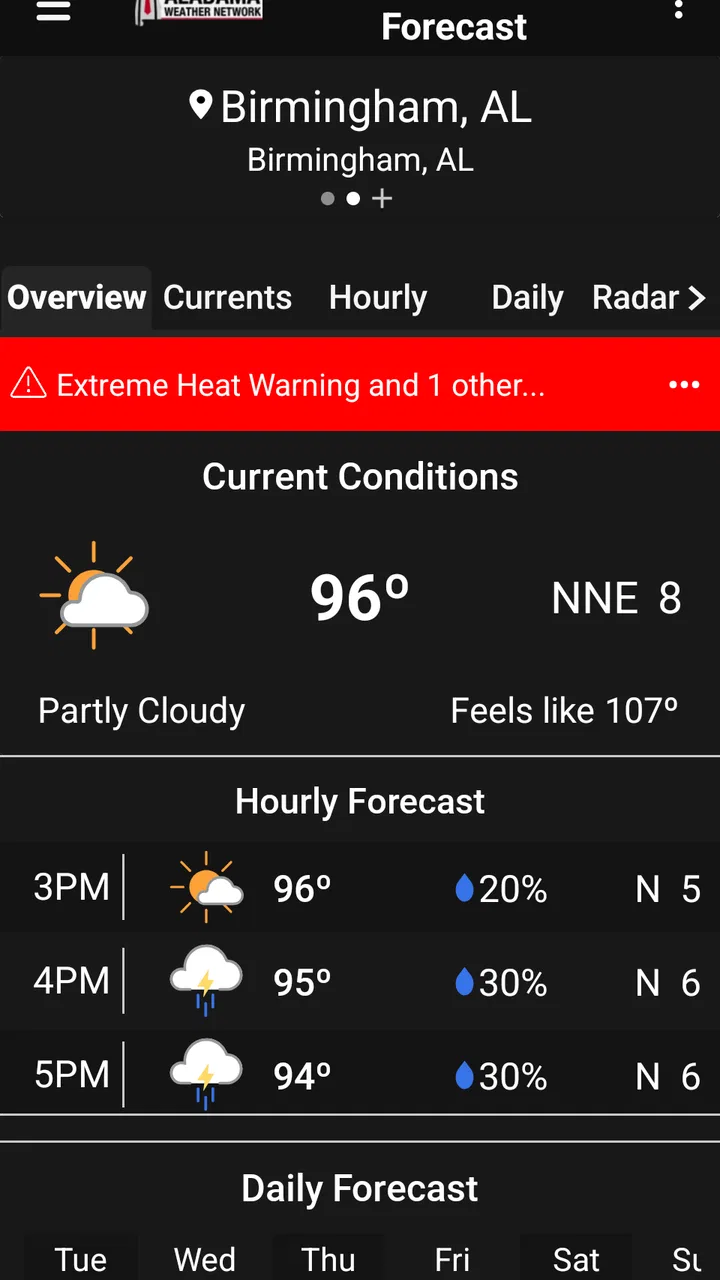
I use weather apps differently depending on the day. Sometimes I need a quick answer before leaving home; other times I need radar, an alert, or a closer look at what is happening nearby. Alabama Weather Network is built for that local-first routine. It is a free weather app from Alabama Weather Network that brings together forecasts, radar, alerts, and Spanncams, with James Spann’s name at the center of the experience. After spending time with it, I found its biggest strength is not trying to be a universal weather tool for every place on earth. It is much more focused: helping people in Alabama make sense of changing conditions through information aimed at their region.
The app sits in the weather category and is suitable for Everyone, which makes it approachable for households that want one shared source of local conditions. It has a 4.7 average from around 123 ratings and has passed 10K+ installs, so it has a modest but clearly established audience. The current version is 6.7.1.9, and it runs on Android 7.0 or later. Those details matter if you are using an older phone, sharing a device with a family member, or deciding whether it is practical for a household with different levels of technical confidence.
How clearly the app presents local weather
I find the app’s clearest value in how it lets me move beyond a single forecast and check local conditions in different ways. That matters when the question is not just whether rain is expected, but whether it is already moving toward a particular part of my day. I’d use this section to consider how that mix supports quick decisions, before looking at how to make it part of a practical routine.
You May Also Like

 AccuWeather: Weather Radar
AccuWeather Review: A Quick, Clear Forecast for Everyday Decisions
For everyday plans, the best forecast is the one you can understand quickly. AccuWeather makes rain timing, radar, and local conditions easy to act on, with a few trade-offs.

 Hill Climb Racing
Why Hill Climb Racing Still Turns Crashes Into One More Run
A tiny car, a bumpy hill and one more upgrade: Hill Climb Racing keeps resurfacing because its simple chaos makes every near-miss feel personal.

 AliExpress - Shopping App
AliExpress Makes Global Shopping Feel Personal, but Shoppers Bear the Risk
AliExpress turns a global marketplace into a pocket-sized discovery engine. Its reach is useful, its shopping loop compelling, and its trade-offs easy to miss.

 Lords Mobile: Kingdom Wars
Lords Mobile Is a Kingdom-Building Routine, Not a Quick Match
A case-by-case verdict on the building, battles, device demands, and social commitments that make Lords Mobile rewarding for some players and exhausting for others.

 PDF Scanner app - TapScanner
TapScanner Makes Paperwork Easier to Capture, Check, and Share
TapScanner makes scanning with a phone feel less like a rescue operation and more like a dependable step in getting work done. Its capture tools are useful, though not flawless.

 Block Blast!
 Shows How Much a Puzzle Game Can Leave Out
A quiet grid game shows why puzzle players increasingly value instant clarity, repeatable skill and low-pressure play—and where the genre still needs to catch up.
More From Our News Desk
View All News


Readability and navigation for quick decisions
The most useful way to approach Alabama Weather Network is as a local information hub rather than a decorative forecast screen. A general weather app may give you a temperature, a small icon, and a broad forecast. This app is more valuable when you want to move from “What is the weather?” to “What should I do about it?” Forecast information answers the planning question, radar helps with movement and timing, alerts support safety, and Spanncams offer a visual check on current conditions.
I appreciate that these tools serve different reading styles. Someone who wants a quick glance can focus on the forecast. A person who understands weather better through movement can use radar. Someone who finds live visual context easier than symbols may prefer Spanncams. That variety is important for accessibility because not every user interprets weather information in the same way. A row of icons may be fast for one person and confusing for another, while a map can be informative but demanding if the user has difficulty distinguishing colors or tracking motion.
The app’s local focus also reduces one common source of confusion: too much irrelevant information. A worldwide weather service can make you search through layers of locations, travel tools, lifestyle cards, and promotional panels before reaching what matters. Alabama Weather Network is more useful when your daily decisions are tied to Alabama conditions. If you are checking whether to take a child to school, drive across town, work outside, or postpone an errand, local weather material is more useful than a broad national dashboard.
For a person who is not comfortable with complicated apps, I would recommend learning one routine rather than trying to use every part immediately. Start with the forecast, then open radar when rain or storms become a concern, and use alerts when conditions appear serious. This staged approach makes the app less overwhelming and gives each section a clear purpose.
Different kinds of weather information in one workflow
One of the more practical strengths is the way the app can support a sequence of decisions. I might first check the forecast while getting ready, then look at radar before leaving, and finally use an alert as a reason to change plans. That is more useful than treating every feature as a separate novelty. The app works best when I use the forecast for preparation, radar for timing, and live camera views for context.
A realistic example would be an afternoon drive during unsettled weather. I would not rely on a single forecast icon to decide whether to leave. I would check the expected conditions, inspect radar for approaching rain, and look for a Spanncam view if I wanted a more tangible sense of what the weather looked like in the area. That combination does not remove uncertainty, but it gives me more than one way to interpret the situation.
This workflow also helps people with different attention needs. A user who finds dense text tiring may prefer a brief visual check. A user who has difficulty judging a map might find a written forecast easier. Someone who wants confirmation before acting can compare the forecast with radar rather than relying on one display. The strongest accessibility choice here is the range of information formats, not a claim that every screen will suit every user.
There is a trade-off, though. More tools can mean more decisions about where to look. A person who expects one large “safe to go” answer may find the experience less direct. Weather is rarely that simple, especially during severe conditions, and the app’s usefulness depends on the user being willing to interpret several sources together.
Motor and sensory considerations
For motor accessibility, the most important question is how much interaction is needed to reach useful information. A weather app is easier to use when a person can get a forecast without repeated precise taps, long gestures, or complicated map manipulation. Alabama Weather Network has a clear practical advantage in having several distinct information areas, because a user can choose the one that requires the least effort for the current task. Someone who finds radar gestures difficult can rely more on the forecast and alerts, while another user may prefer visually exploring radar instead of reading several lines of text.
Radar is also where motor and sensory demands can increase. Maps often require careful touch control, and animated weather movement can be harder to follow for people who are sensitive to motion or who have difficulty distinguishing overlapping colors. I would treat radar as a supporting tool rather than the only source of information. If the map is tiring, unclear, or visually busy, switch to the written forecast or an alert instead of forcing yourself to decode it.
Spanncams provide another useful alternative, but live visual information will not work equally well for everyone. A person with limited vision may get less value from a camera view, while someone who struggles with abstract map symbols may find a real-world image easier to understand. The important point is that the app offers more than one path to weather awareness. It does not make every path equally accessible, but it gives users some choice.
For sensory needs, I would use the app in a calm setting before relying on it during a stressful weather event. Explore the forecast, radar, alerts, and camera sections when conditions are ordinary. That way, if a warning appears later, you are not trying to learn the interface while also making a safety decision. This is a small habit, but it can make a meaningful difference for users who become overloaded by urgent information.
People who are sensitive to flashing, motion, or strong visual contrast should be especially selective about how they use map and camera content. I would not assume that a moving radar display is automatically easier than text. The best option depends on the individual, and the app is most inclusive when users feel free to choose the least demanding format rather than treating every feature as mandatory.
Using the app in real situations
Situational access matters as much as permanent disability. A person may be using the app outdoors in bright light, checking it while carrying groceries, dealing with poor connectivity, or trying to make sense of weather while anxious. A driver may need to check conditions before starting a trip, not while moving. Someone working outside may have only a short break to understand whether conditions are changing. In these moments, a concise forecast or alert can be more practical than exploring a detailed map.
I would make a habit of checking the app before leaving rather than depending on it while walking or driving. That reduces the need for precise interaction in an unsafe context. It also gives the user time to compare the forecast with radar and decide whether the planned route or activity still makes sense. For a family, one person could check the app and explain the relevant information to someone who finds weather interfaces difficult.
The app is particularly well suited to Alabama residents whose plans are affected by fast-changing local weather. A parent deciding whether outdoor activities should continue, a commuter planning a route, or a worker preparing for conditions outside can all benefit from having local forecasts, radar, alerts, and Spanncams in one place. The local emphasis is more important here than a long list of general weather extras.
Travelers need to be more careful about expectations. If your main use is checking weather across many states or countries, a broader weather service may be more convenient. Alabama Weather Network makes the most sense when Alabama is the center of your routine. It can still be useful during travel through the state, but it is not the first app I would choose for someone whose weather needs are primarily international.
Older devices are another practical consideration. Because the app supports Android 7.0 or later, it remains an option for some people who are not using the newest phone. That can help families keep an older device available for weather checks. At the same time, older hardware may make maps, camera content, or changing weather displays feel less comfortable than they do on a newer phone. The minimum operating-system requirement makes installation possible, but it does not guarantee the same experience on every device.
What may still create barriers
The app’s main limitation is that local weather information can still be information-heavy. Forecasts, radar, alerts, and camera views each answer different questions, but a new user may not immediately know which one to trust for a particular decision. The app would be easier for some people if its organization made the recommended order of use especially obvious during changing conditions. In practice, users may need to develop their own routine.
Radar can also create an interpretation barrier. Weather maps are powerful, but they are not self-explanatory for everyone. Colors, movement, geographic shape, and timing all need to be understood together. A user with color-vision differences, low vision, cognitive fatigue, or limited weather experience may need an alternative explanation from a family member or another source. I would never use the radar alone as a reason to take or cancel a serious safety action.
Live camera views have a different weakness: they are visual and location-specific. They may help someone understand conditions in one place, but they cannot replace a forecast for a wider area. A camera can show what is happening at its viewpoint without answering what the weather will do along an entire route. This is a useful distinction for anyone who is tempted to treat a clear-looking image as proof that travel conditions are safe everywhere.
Alerts are valuable because they reduce the need to continually search for information, but alerts can also be stressful. Some users may prefer to limit how often they check the app, while others may need a family member to help interpret a warning. I would treat an alert as a prompt to read and evaluate the situation, not as a complete set of instructions. The app can bring attention to changing conditions; the user still needs to decide what action is appropriate.
There is also a broader inclusion issue: not every user approaches weather through the same language, visual assumptions, or level of knowledge. Alabama Weather Network is more flexible than a single-format forecast because it includes several ways to inspect conditions, but flexibility is not the same as universal accessibility. People who need highly specialized assistive support should test the app on their own device before making it their only weather resource.
Who should use it and who should choose something else
I would recommend Alabama Weather Network to Alabama residents who want a locally focused weather companion and who value more than a simple temperature reading. It is a good match for people who want to move between forecasts, radar, alerts, and Spanncams depending on the situation. It also suits households where different people prefer different ways of understanding weather: one person can read the forecast, another can inspect radar, and another can look at a camera view.
The free price makes it easy to try without turning the decision into a financial commitment. The Everyone age rating also makes it reasonable for shared household use, although younger users should still be taught that weather information needs careful interpretation during dangerous conditions. The app’s 4.7 average and 10K+ installs suggest that it has found a real audience, but I would judge it by fit rather than popularity.
I would choose a different kind of weather app if I needed extensive international coverage, highly specialized travel planning, or a single minimalist screen with almost no extra interaction. I would also avoid making this my only source if I needed accessibility behavior that must be verified for a particular assistive setup. In that case, I would install it alongside a service I already know works well with my device and personal needs.
Compared with a typical general-purpose weather app, this one feels more useful for local awareness and less useful as an all-purpose travel dashboard. Its advantage is the combination of regional forecasts, radar, alerts, and Spanncams. Its cost is that users may need to interpret more than one kind of information. That is a worthwhile trade for people who want context, but unnecessary complexity for someone who only wants tomorrow’s temperature.
My inclusive verdict
After using it as a local weather tool, I see Alabama Weather Network as a practical choice for people who want several ways to understand Alabama conditions. It supports different abilities and situations by offering text-based forecasts, map-based radar, alerts, and visual camera content rather than forcing every user into one format. That does not make every screen equally easy, and radar or live imagery may still be challenging for some people, but the choice of format is a genuine strength.
My advice is to set up a simple personal workflow: use the forecast for routine planning, radar for timing, alerts for changing or serious conditions, and Spanncams for additional visual context. Learn that workflow before you need it urgently. If one format is tiring or difficult, use another instead of assuming you must master every feature.
Alabama Weather Network is best for Alabama-focused users who want more local detail than a basic forecast widget provides. Developed by Alabama Weather Network and offered free for Android users on version 7.0 or later, it combines useful depth with a clear regional purpose. I would recommend it to anyone who wants a practical second look at changing weather, while reminding users with specialized accessibility needs or broad international requirements to keep another suitable option available.
For my own use, the app earns its place when weather decisions involve timing, movement, or uncertainty. It is not perfect for every user, and it is not the simplest possible weather screen, but its local focus and multiple information paths make it more helpful than a generic forecast when conditions deserve closer attention.
FAQs for Alabama Weather Network
01What features does the Alabama Weather Network app offer?
The Alabama Weather Network app provides real-time weather updates, radar imagery, and severe weather alerts. It includes detailed forecasts, temperature trends, and a 10-day outlook. Users can customize notifications for specific weather events and access interactive maps for a comprehensive view of weather patterns in Alabama.
02Is the Alabama Weather Network app free to download and use?
Yes, the Alabama Weather Network app is free to download on both Android and iOS platforms. While the basic features are available for free, there may be optional in-app purchases or subscriptions for premium features like ad-free usage or advanced weather data analytics.
03How accurate is the weather information provided by the app?
The Alabama Weather Network app sources its data from reputable meteorological services, ensuring high accuracy in its forecasts and updates. The app uses advanced algorithms and real-time data to provide users with reliable weather information, although users should always be prepared for minor discrepancies in rapidly changing conditions.
04Can I receive severe weather alerts through the app?
Yes, the Alabama Weather Network app offers customizable severe weather alerts. Users can set up notifications for specific weather events such as thunderstorms, tornadoes, or flash floods. This feature ensures that users receive timely warnings, allowing them to take necessary precautions to stay safe.
05Does the app require an internet connection to function?
The Alabama Weather Network app requires an internet connection to provide real-time weather updates and access interactive maps. However, once data is downloaded, users can view certain information offline. For the most accurate and current weather information, an active internet connection is recommended.
Pros
- Accurate local weather forecasts.
- User-friendly interface for easy navigation.
- Real-time severe weather alerts.
- Detailed radar and satellite imagery.
- Customizable notifications for specific areas.
Cons
- Ads can be intrusive at times.
- Limited customization of widgets.
- Requires internet for real-time updates.
- Some features locked behind a paywall.
- Occasional slow loading times.

Alabama Weather Network
Gallery